Help Topics
Back to all Help Topics
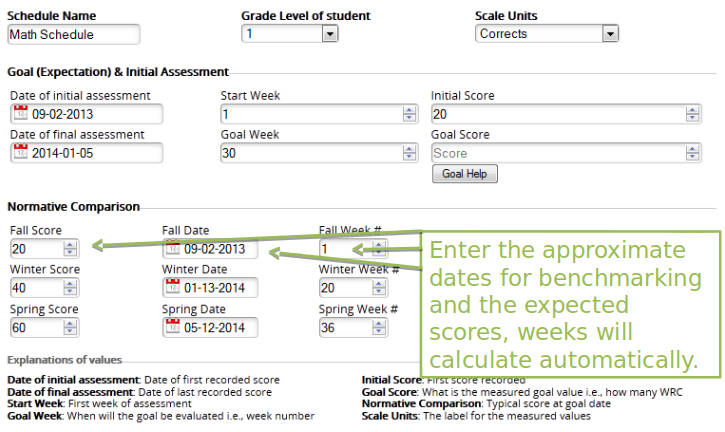
Normative Comparisons give us an idea of how much typical students grow.
Determine what you want the student to be able to do and when. Enter dates for initial and final assessment. Enter the initial score, then use the Goal Help assistant to determine the goal for the student.
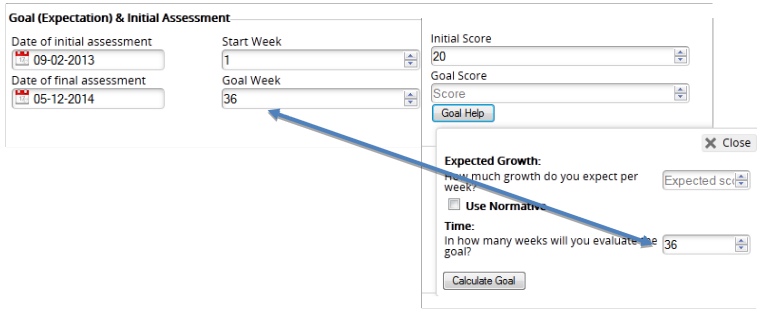
The goal assistant will take the information you have entered, then calculate a goal.

The goal assistant will take the information you have entered, then calculate a goal.
For example, if you wanted the student to improve by 1.5 corrects per week for 36 weeks, the goal would be 74.
20 + 1.5 x 36 = 74

The goal assistant will take the information you have entered, then calculate a goal.
For example, if you wanted the student to grow as much as what is typical, select: use normative. In this example, the student would grow 100% of what is typical (1), which is a rate of improvement of 1.1 corrects per week for 36 weeks. Now the goal is 60.
20 + 1.1 x 36 = 60
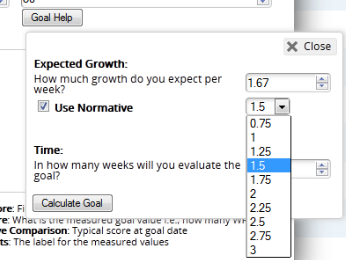
The goal assistant will take the information you have entered, then calculate a goal.
Use the goal setting assistant to quickly calculate goals based on your expectations from experience or use the normative accelerator to calculate what you want your student to be able to do
(No. 21)
Goal Setting and Normative Comparison
Normative Comparisons give us an idea of how much typical students grow. Determine what you want the student to be able to do and when.
Enter Dates for Annual Benchmarks and Expected Targets
Normative Comparisons give us an idea of how much typical students grow.
Enter what you know about student performance
Determine what you want the student to be able to do and when. Enter dates for initial and final assessment. Enter the initial score, then use the Goal Help assistant to determine the goal for the student.
The goal assistant will take the information you have entered, then calculate a goal.
The goal assistant will take the information you have entered, then calculate a goal.
For example, if you wanted the student to improve by 1.5 corrects per week for 36 weeks, the goal would be 74.
20 + 1.5 x 36 = 74
The goal assistant will take the information you have entered, then calculate a goal.
For example, if you wanted the student to grow as much as what is typical, select: use normative. In this example, the student would grow 100% of what is typical (1), which is a rate of improvement of 1.1 corrects per week for 36 weeks. Now the goal is 60.
20 + 1.1 x 36 = 60
The goal assistant will take the information you have entered, then calculate a goal.
Use the goal setting assistant to quickly calculate goals based on your expectations from experience or use the normative accelerator to calculate what you want your student to be able to do